
ILLUSTRATIVE PROJECT / CUSTOMER PORTAL
One place for the next customer decision.
A possible project direction, explained through the work it would support. Fictional branding and sample data; this is not a completed client engagement.
THE PEOPLE AND THE PROBLEM
Built around a real kind of friction.
Intended users
Customers reviewing project progress and the internal team coordinating delivery.
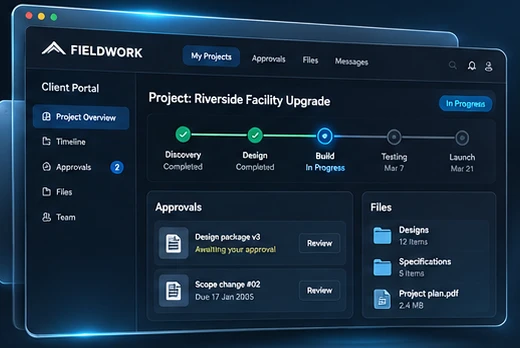
Project updates become difficult to follow when approvals, file revisions, and messages are spread across email. Customers may not know which document is current or what they need to do next. This concept gives the project a shared, organized front door.
The proposed approach
Bring progress, pending approvals, files, and project communication into a focused customer view. Distinguish information from action so a visitor can understand what has changed and whether a decision is waiting for them.
THE PROPOSED JOURNEY
How the workflow could come together.
- 01
Understand progress
Review the current project stage, upcoming milestone, and any action requiring attention.
- 02
Review the right material
Open the relevant document or request with enough context to make a decision.
- 03
Respond with context
Record an approval, question, or clarification against the item it concerns.
VALIDATE BEFORE BUILDING
The questions behind the screens.
A polished concept is a way to test direction. These questions help turn the idea into a responsible project scope.
- Who can view each project, document, and conversation?
- What constitutes approval, and can it be revised or withdrawn?
- How are file revisions identified and retained?
- Which internal system supplies project progress and notifications?
A USEFUL FIRST ENGAGEMENT
Make the idea reviewable.
Customer journey, portal prototype, role and access requirements, approval rules, and an implementation scope.